CompTIA Security+ Exam Notes

CompTIA Security+ Exam Notes
Let Us Help You Pass
Showing posts sorted by relevance for query digital signature. Sort by date Show all posts

Monday, July 29, 2024

Digital Signature: Exam notes CompTIA Security+

 Digital Signature

Listed below are the items you need to know for the exam:

Digital signatures provide:
  • Non-repudiation
  • Authentication
  • Integrity
Creating the digital signature is a 2 step process:
  • First, hash the email/message
  • Second, the private key digitally signs (encrypts) the hash
The digital signature is created with the "sender's" keys. 

The digital signature is an encrypted wrapper for the sender's public key.

The recipient's system extracts the public key and decrypts the digital signature to validate the sender.

RSA and DSA (Digital Signature Algorithm) are used to create digital signatures.

Saturday, August 11, 2018

ASYMMETRIC ENCRYPTION

Asymmetric encryption uses two different keys, a public key and a private key, which are mathematically paired to work together. Asymmetric encryption is commonly called "Public Key" encryption. You will need a Certificate Authority to use asymmetric encryption.

It only encrypts small bits of data. The data or message must be smaller than the asymmetric key. 

Only used to encrypt symmetric keys (used for encrypting data at rest, and encrypting the hashes (combined this creates the "Digitial Signature".


The Public Key is available to everyone, the Private Key is only available to you. Users are not to share their Private Key with anyone. My way of telling people how to remember who gets the Private Key, "YOU HAVE TO KEEP YOUR PRIVATES: PRIVATE" keys. 

In this blog, we are going to cover the use of asymmetric encryption when it comes to emails or messages, and documents (files). 

ENCRYPTION & DECRYPTION: is performed with the recipient's keys:
1. If you were to send an email (Message, document, or file) to Dave, and you want only Dave to read it, you would encrypt with Dave's Public Key. 

2. Dave would then decrypt the email (Message, document, or file) with his Private Key. 

DIGITAL SIGNATURE: is always perform with the sender's keys.
1. First, the email (Message, document, or file) is hashed, the encrypted (Signed: Digitally signed) whit the sender Private Key. This Digital Signature will include the sender's Public Key.

2. The recipient will use the senders Public Key to verify that the digital signature is valid. The recipient validates the Public key to the issuing Certificate Authority.

Common asymmetric encryptions:
RSA: Typically used with X.509 certificates, it encrypts the certificate
DSA: Digital Signature Algorithm
ECC: Elliptic Curve Cryptography, mainly used with mobile devices due to less processing power

Thursday, October 16, 2025

Code Signing Explained: How Digital Signatures Secure Your Software

 Code Signing

Code signing is a security technique used to verify the authenticity and integrity of software, scripts, or executables. It involves digitally signing code with a cryptographic signature to assure users that the code has not been altered or tampered with since it was signed, and that it comes from a trusted source.

Why Code Signing Matters
Code signing helps:
  • Prevent malware: Ensures the code hasn’t been modified by malicious actors.
  • Build trust: Users and systems can verify the publisher’s identity.
  • Enable secure distribution: Operating systems and browsers often block unsigned or improperly signed code.
  • Support compliance: Required in many regulated industries.
How Code Signing Works
1. Generate a key pair:
  • The developer or organization creates a public/private key pair.
  • The private key is used to sign the code.
  • The public key is included in a digital certificate issued by a Certificate Authority (CA).
2. Sign the code:
  • A hash of the code is created.
  • The hash is encrypted with the private key to create a digital signature.
  • The signature and certificate are attached to the code.
3. Verify the signature:
  • When the code is run or installed, the system:
    • Decrypts the signature using the public key.
    • Recalculates the hash of the code.
    • Compares the two hashes to ensure integrity.
    • Checks the certificate to verify the publisher.
Common Use Cases
  • Software installers (.exe, .msi)
  • Mobile apps (iOS and Android)
  • Browser extensions
  • PowerShell scripts
  • Drivers and firmware
Benefits
  • Authenticity: Confirms the publisher's identity.
  • Integrity: Detects tampering or corruption.
  • User confidence: Reduces the number of security warnings during installation.
  • Platform compatibility: Required by Windows, macOS, and mobile platforms.
Risks and Considerations
  • Stolen certificates: If a private key is compromised, attackers can sign malware.
  • Expired certificates: May cause warnings or installation failures.
  • Improper implementation: Can lead to false trust or broken verification.

Monday, January 27, 2025

Understanding the Role of Trusted Platform Module (TPM) in Enhancing System Security

 TPM (Trusted Platform Module)

A Trusted Platform Module (TPM) is a specialized microchip embedded within a computer's motherboard that functions as a hardware-based security mechanism. It is designed to securely store and manage cryptographic keys, such as passwords and encryption keys, to protect sensitive information and verify the integrity of a system by detecting any unauthorized modifications during boot-up or operation. The TPM essentially acts as a tamper-resistant component to enhance overall system security. It can be used for features like BitLocker drive encryption and secure logins through Windows Hello. 

Key points about TPMs:
  • Cryptographic operations: TPMs utilize cryptography to generate, store, and manage encryption keys, ensuring that only authorized entities can access sensitive data. 
  • Tamper resistance: A key feature of a TPM is its tamper-resistant design. Attempts to physically manipulate the chip to extract sensitive information will be detected, potentially triggering security measures. 
  • Platform integrity measurement: TPMs can measure and record the state of a system during boot-up, allowing for verification that the system hasn't been tampered with and is running the expected software. 
  • Endorsement key: Each TPM has a unique "Endorsement Key," which acts as a digital signature to authenticate the device and verify its legitimacy. 
Applications:

TPMs are commonly used for features like:
  • Full disk encryption: Securing hard drives with encryption keys stored within the TPM. 
  • Secure boot: Verifying that the operating system loaded during boot is trusted and hasn't been modified. 
  • User authentication: Storing credentials like passwords or biometric data for secure logins. 
  • Virtual smart cards: Implementing digital certificates and secure access to sensitive applications. 
How a TPM works:
  • Key generation: When a user needs to create a new encryption key, the TPM generates a secure key pair and keeps the private key securely within the chip. 
  • Storage: The TPM stores the encryption keys and other sensitive data in a protected area, preventing unauthorized access. 
  • Attestation: When a system needs to prove its identity, the TPM can create a digital signature (attestation) based on its unique Endorsement Key, verifying its authenticity. 
Important considerations:
  • Hardware requirement: A computer must install a dedicated TPM chip on the motherboard to utilize a TPM. 
  • Operating system support: The operating system needs to be configured to utilize the TPM functionalities for enhanced security.
This is covered in A+, Security+, and SecurityX (formerly known as CASP+)

Thursday, July 16, 2026

Elliptic Curve Cryptography (ECC): The Essential Security+ Exam Guide

 ECC (Elliptic Curve Cryptography)

Elliptic Curve Cryptography (ECC) for Security+: What You Need to Know for the Exam

1. What ECC Is (Security+ Definition)

Security+ defines ECC as:

A lightweight asymmetric cryptographic algorithm that uses elliptic curve mathematics to provide strong security with smaller key sizes.

ECC is a form of public‑key cryptography, just like RSA, but it achieves the same security strength with much smaller keys. That efficiency makes ECC ideal for:

·         Mobile devices

·         IoT devices

·         Low‑power systems

·         Modern TLS/SSL certificates

On the exam, ECC is often the correct answer when the question mentions low-power, mobile, wireless, or resource-constrained environments.

2. Why ECC Matters for Security+

Security+ wants you to know why ECC is preferred over RSA in many modern systems.

ECC Advantages (Exam-Relevant)

·         Smaller key sizes → faster, lighter, more efficient

·         Stronger security per bit

·         Ideal for mobile and IoT

·         Used in modern certificates and secure protocols

ECC vs RSA (Exam Tip)

If a question asks:

“Which asymmetric algorithm provides strong security with minimal computational overhead?”

The correct answer is ECC.

If a question asks:

“Which algorithm uses large key sizes and is slower?”

The answer is RSA.

3. ECC Key Sizes You Should Know

Security+ doesn’t require memorizing exact numbers, but understanding the comparison helps:

Security Strength

RSA Key Size

ECC Key Size

128-bit

3072 bits

256 bits

Exam takeaway: ECC achieves the same security as RSA with much smaller keys.

4. ECC Algorithms You Must Know for Security+

Security+ expects you to recognize the ECC-based algorithms used for key exchange and digital signatures.

ECDH:  Elliptic Curve Diffie-Hellman

Used for key exchange.

Exam clue: If the question mentions “secure key exchange using elliptic curves,” the answer is ECDH.

ECDSA:  Elliptic Curve Digital Signature Algorithm

Used for digital signatures.

Exam clue: If the question mentions “signing data using elliptic curves,” the answer is ECDSA.

5. Where ECC Is Used (Security+ Context)

ECC appears in several technologies Security+ tests:

TLS/SSL Certificates

Modern HTTPS often uses ECC keys.

Mobile and IoT Devices

ECC is the preferred asymmetric algorithm for constrained environments.

Cryptocurrencies

Bitcoin uses ECDSA for signing transactions.

SSH, PGP, and modern VPNs

Many modern implementations support ECC keys.

6. ECC Exam Tips and Traps

Here are the most common ECC-related question patterns:

Mobile devices

·         IoT

·         Low power

·         Limited bandwidth

·         Modern TLS

·         Digital signatures (ECDSA)

·         Key exchange (ECDH)

ECC is NOT used for:

·         Symmetric encryption

·         Hashing

·         Block ciphers

·         Stream ciphers

If the question asks for symmetric encryption, the answer will be AES, not ECC.

7. Quick Security+ Summary

1.       ECC is an asymmetric algorithm.

2.       ECC provides strong security with small keys.

3.       ECDH = key exchange; ECDSA = digital signatures.

4.       ECC is ideal for mobile and IoT.

5.       ECC is used in modern TLS certificates.

6.       ECC is used low power devices, low overhead

Friday, September 4, 2026

Cryptographic Vulnerabilities for CompTIA Security+: Complete Exam Prep

Cryptographic Vulnerabilities: 
Security+ Exam Prep

Cryptography is one of the most heavily tested domains on the CompTIA Security+ exam. While understanding encryption algorithms and certificate management is important, Security+ also expects candidates to identify and mitigate cryptographic vulnerabilities.

A cryptographic vulnerability occurs when weaknesses in encryption algorithms, implementations, key management practices, or configurations allow attackers to undermine the confidentiality, integrity, authentication, or non-repudiation of data.

This guide covers the most important cryptographic vulnerabilities you need to understand for the Security+ exam and real-world cybersecurity operations.

Why Cryptographic Vulnerabilities Matter

Organizations use cryptography to protect:

  • Passwords
  • Payment information
  • Personally Identifiable Information (PII)
  • Healthcare records
  • Intellectual property
  • Authentication systems
  • VPN communications

When cryptography is improperly implemented or outdated, attackers may be able to:

  • Read sensitive information
  • Impersonate legitimate users
  • Modify protected data
  • Bypass authentication controls
  • Decrypt confidential communications

Common Cryptographic Vulnerabilities

Weak Encryption Algorithms

One of the most common cybersecurity mistakes is continuing to use outdated encryption standards.

Examples

DES (Data Encryption Standard)

DES uses:

  • 56-bit key

Modern computing power can crack DES relatively quickly.

3DES

  • 56-bit key

RC4

RC4 was once popular in:

  • SSL
  • TLS
  • WEP

Researchers discovered multiple weaknesses allowing attackers to recover encrypted information.

MD5 (128-bit)

Although technically a hashing algorithm rather than encryption, MD5 suffers from collision vulnerabilities and should not be used for security-sensitive applications.

SHA-1 (160-bit)

SHA-1 has known collision attacks and is largely deprecated.

Security+ Exam Tip

If the exam asks which algorithm should be replaced immediately, common insecure choices include:

  • DES
  • 3DES
  • RC4
  • MD5
  • SHA-1
  • WEP

Key Management Vulnerabilities

Even strong encryption becomes ineffective if key management is poor.

Hard-Coded Keys

Developers sometimes embed encryption keys directly into source code.

If attackers obtain the code, they obtain the key.

Poor Key Storage

Keys stored in:

  • Plaintext files
  • Shared network drives
  • Configuration files

can be easily stolen.

Lost Key Control

If cryptographic keys are shared among too many users:

  • Accountability decreases
  • Insider threats increase
  • Key compromise becomes difficult to detect

Key Reuse

Reusing identical keys across:

  • Multiple applications
  • Several databases
  • Entire environments

creates a single point of failure.

Compromise of one system may compromise all systems using the same key.

Weak Random Number Generation

Encryption relies heavily on randomness.

Cryptographic operations require:

  • Session keys
  • Encryption keys
  • Initialization vectors
  • Nonces

If predictable random values are generated, attackers may predict cryptographic secrets.

Poor Certificate Management

Digital certificates are frequently targeted on Security+ exams.

Expired Certificates

Expired certificates can:

  • Break TLS communications
  • Generate browser warnings
  • Reduce user trust

Self-Signed Certificates

Self-signed certificates lack trusted third-party validation.

Risks include:

  • Impersonation attacks
  • Reduced trust
  • Easier spoofing

Weak Certificate Authorities

Compromise of a Certificate Authority (CA) can result in fraudulent certificates being issued.

Attackers may then perform:

  • Website impersonation
  • SSL/TLS interception
  • Man-in-the-middle attacks

Man-in-the-Middle (MITM) Attacks

A MITM attack occurs when an attacker intercepts communication between two parties.

Potential outcomes:

  • Credential theft
  • Session hijacking
  • Data modification

Why Cryptography Fails Here

Poor certificate validation often enables MITM attacks.

Examples include:

  • Ignoring certificate warnings
  • Accepting invalid certificates
  • Using self-signed certificates

Downgrade Attacks

A downgrade attack forces communication to use weaker security protocols.

Example

Both systems support:

  • TLS 1.3

An attacker forces negotiation to:

  • TLS 1.0

The attacker then exploits weaknesses in the older protocol.

Deprecated Protocols

SSL

Secure Sockets Layer (SSL) is obsolete.

Avoid:

  • SSL 2.0
  • SSL 3.0

Early TLS Versions

Weak versions include:

  • TLS 1.0
  • TLS 1.1

Modern systems should use:

  • TLS 1.2
  • TLS 1.3

WEP

WEP uses weak encryption and poor key management.

Common vulnerabilities include:

  • IV reuse
  • Weak keys
  • Rapid key cracking

Modern wireless networks should use:

  • WPA2
  • WPA3

Hashing Vulnerabilities

Hashing protects:

  • Passwords
  • File integrity
  • Digital signatures

Weak hashing implementations create vulnerabilities.

Collision Attacks

A collision occurs when:

  • Hash(A) = Hash(B)

for two different inputs.

Algorithms vulnerable to collisions:

  • MD5 (128-bit)
  • SHA-1 (160-bit)

Unsalted Password Hashes

Without salting:

  • password123

always generates the same hash.

With salting (exact same password for 10 users)

Each password hash will be unique

Attackers can leverage:

  • Rainbow tables
  • Precomputed hash databases

Proper Password Hashing

Modern implementations include:

  • Salt
  • Iterations
  • Key stretching

Examples:

  • bcrypt
  • PBKDF2
  • Argon2
  • scrypt

Digital Signature Vulnerabilities

Digital signatures provide:

  • Integrity
  • Authentication
  • Non-repudiation

Weaknesses arise when:

  • Signing keys are stolen
  • Weak hashing algorithms are used
  • Certificates expire

Private Key Compromise

If a signing key is stolen:

Attackers can:

  • Forge signed software
  • Create malicious updates
  • Impersonate legitimate organizations

Side-Channel Attacks

Not all attacks break the encryption algorithm itself.

Some attacks observe how cryptography operates.

Timing Attacks

Attackers measure:

  • Response Time

to infer information about cryptographic operations.

Power Analysis

Attackers monitor:

  • Power Consumption

during encryption processes to recover secret keys.

Electromagnetic Analysis

Attackers observe electromagnetic emissions from systems performing cryptographic operations.

Side-channel attacks exploit implementation weaknesses, not algorithm weaknesses.

Quantum Computing Risks

A sufficiently powerful quantum computer could weaken:

  • RSA
  • Diffie-Hellman
  • ECC

Organizations are researching:

  • Post-Quantum Cryptography (PQC)

to prepare for future threats.

Using HTTP Instead of HTTPS

  • Data remains unencrypted and vulnerable to interception.

Improper Key Rotation

  • Organizations that fail to rotate keys increase the likelihood of long-term compromise.

Sharing Service Accounts

Shared accounts often result in shared cryptographic credentials and poor accountability.

Security+ Quick Review Sheet

Weak Algorithms

Avoid:

  • DES
  • 3DES
  • RC4
  • MD5
  • SHA-1

Weak Protocols

Avoid:

  • SSL 2.0
  • SSL 3.0
  • TLS 1.0
  • TLS 1.1
  • WEP

Important Vulnerabilities

Know:

  • Plain Text
  • Downgrade attacks
  • MITM attacks
  • Collision attacks
  • Side-channel attacks
  • Key management failures
  • Certificate weaknesses

Tuesday, October 15, 2024

Digitizer

 Digitizer

A digitizer is a device that allows users to input drawings, sketches, and handwritten notes into a computer. It's also a graphics tablet, drawing tablet, or pen tablet.

A digitizer has a pressure-sensitive flat surface and a stylus or pen-like instrument that users draw or write with. The digitizer's sensors detect the stylus's movements and pressure levels and send the data to the computer. The computer then processes the data and translates it into visual elements on the screen.

Digitizers are used for many purposes, including:

  • Drawing and painting: Digitizers can recreate the drawing experience with a pen on paper.
  • Creating and editing notes: Digitizers can create and edit handwritten notes or text documents.
  • Digital signatures: Digitizers are a base component of many digital signature technologies.

On a laptop, a touchscreen digitizer is an additional screen that sits on top of the laptop's LCD screen. There are two types of touchscreen laptops:

  • Standard LCD with separate digitizer glass: The LCD displays the image, and the digitizer glass responds to touch.
  • Embedded touchscreen: The touch is embedded into the LCD during manufacturing.

Thursday, October 17, 2024

S/MIME: Encrypting and Signing Emails for Maximum Security

 S/MIME

Secure/Multipurpose Internet Mail Extensions (S/MIME) is an industry standard that encrypts and digitally signs emails to ensure their integrity and security:

  • Encryption: Protects the contents of emails
  • Digital signatures: Verifies the sender's identity
  • Message integrity: Ensures the email's contents are not altered
  • Non-repudiation: Provides a way to prove the origin of the email
  • Authentication: Verifies the identities of both the sender and recipient

S/MIME is compatible with most enterprise email clients, including Outlook for iOS and Android. To add or remove a digital signature from a message in Outlook on the web, you can:

  • Go to the top of the message
  • Select More options > Message options
  • Select or deselect Digitally sign this message (S/MIME)

Monday, April 20, 2020

Identity and Authentication Factors

IDENTITY

The first part of a login process is providing some form of identification, such as a username or email address

AUTHENTICATION FACTORS

Proves that the user is who they claim to be. Authentication credentials should be kept secret. This helps prevent unauthorized users from gaining access to confidential information. There are five authentication factors.

1. Something you know: Password, PIN, passphrase, security question answer, CAPTCHA, a PIN that was mailed to you.

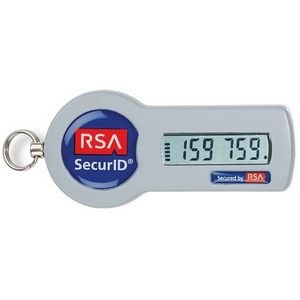
2.  Something you have: CAC (Common Access Card), PIV (Personal Identity Verification), Smart Card, Digital Certificate (CAC, PIV, & Smart Card are all digital certificates), PIN or code sent to your cell phone, key fob or token (pic to the right)

3. Something you are: Fingerprint, iris scan, retina scan, facial scan, voice pattern, palm geometry.

4. Somewhere you are: IP address, MAC address, GPS location computer name.

5. Something you do: Signature analysis, signature dynamics, have the user sign their name, keyboard timing, keystroke dynamics, gait (the way you walk), finger swipe pattern.

Sunday, April 19, 2020

Certificates - PKI (Public Key Infrastructure)

Types of Certificates

Self-signed: This type of certificate is owned by the server that signed it. They will be untrusted inside an organization until the certificate is imported into the machine attempting to access the server,

Root: Identifies the CA (Certificate Authority). There is no other authority higher than the root, therefore its certificate must be self-signed.

User: There are certificate templates for standard users, administrators, recovery agents, smart card logon, etc.

Email: These are used for digital signature and the encryption/decryption of emails. Emails can be referred to as messages or electronic messages.

Code-signing certificates: These are used with software/applications to validate the end-user the integrity of the product.

Domain Validation (DV): This proves the ownership for a domain. Not the most secure method as it is vulnerable to compromise.

Extended Validation (EV): A thorough check is required to validate the ownership of the domain. This is also the most trusted certificate. EV protects against phishing attacks. 

Subject Alternative Name (SAN): Some organizations own multiple domains and may choose to combine them into one certificate. 
google.com
google.ca
android.com
youtube.com
Above are just a few of the domains Google owns. These can be combined into one certificate, making this certificate a SAN. If the company adds another domain after the certificate has been issued, they will need to purchase a new certificate.

Below is another example of when you would use a SAN certificate. If the organization installed three different web servers and the certificate needed to match the hostname, it would need a SAN certificate.
sales.example.com
info.example.com
training.example.com
In this case, the hostnames for the above are as follows: "sales", "info", and "training". 

Wildcard: The Wildcard certificate will protect all first-level sub-domains as long as they belong to the same domain. This reduces the burden of an administrator have to account for a certificate for each sub-domain.

research.practice.com
marketing.practice.com
dallas.practice.com
chicago.practice.com
seattle.practice.com

The five above all belong to the same domain, so instead of five certificates, one could be purchased:

*.practice.com

X.509 Certificate: What you need to know
Hashed with SHA
Encrypted with RSA
The entity that issued the certificate
The entity that the certificate was issued to
The validity date: from and to

Saturday, July 24, 2021

Passwordless Authentication: The Future of Secure and Seamless Logins

 Passwordless Authentication

Passwordless authentication replaces traditional passwords with alternative methods for verifying a user's identity, offering enhanced security and a more user-friendly experience. Instead of relying on something the user knows (a password), it utilizes factors like biometrics, possession of a device, or unique digital keys. This approach minimizes the risk of password-related vulnerabilities, such as phishing and theft, while also simplifying the login process.
 
How Passwordless Authentication Works:
Passwordless authentication leverages different methods to verify a user's identity without relying on passwords. Here's a breakdown of common approaches:
1. Biometrics:
  • This method uses unique biological traits like fingerprints, facial recognition, or iris scans to verify identity.
  • Users unlock their devices or access applications by simply scanning their fingerprint or using facial recognition, eliminating the need for passwords.
  • Examples include fingerprint sensors on smartphones or facial recognition features in laptops. 
2. Possession Factors:
  • This approach relies on something the user possesses, like a device or a security key. 
  • One-Time Passwords (OTPs): Users receive a unique, time-sensitive code via SMS or an authentication app, which they enter to log in. 
  • Magic Links: Users receive a link via email or other messaging app. Clicking the link grants access to the user, eliminating the need for a password. 
  • Hardware Security Keys: Users plug in a physical device (like a USB key) to authenticate. 
3. FIDO2/WebAuthn:
  • This standard utilizes public-key cryptography to generate a unique key pair for each website or application.
  • The private key remains securely stored on the user's device (e.g., smartphone, computer), while the public key is registered with the service.
  • When logging in, the service sends a challenge, which the user's device signs using the private key. The service then verifies the signature using the public key. 
Benefits of Passwordless Authentication:

Enhanced Security: Reduces the risk of phishing attacks, password theft, and other vulnerabilities associated with passwords.

Improved User Experience: Eliminates the hassle of remembering and typing complex passwords, making login faster and easier.

Reduced Support Costs: Password-related helpdesk calls decrease as users don't need to reset passwords as frequently.

Increased User Satisfaction: Removing password frustrations leads to a more positive user experience. 

Examples:
Windows Hello: Microsoft's solution for passwordless authentication using facial recognition, fingerprint scanning, or a PIN. 
Google Chrome's Passwordless Login: Chrome allows users to log in to websites using security keys or QR codes linked to their devices. 
Authenticator Apps: Apps like Google Authenticator or Microsoft Authenticator generate time-based one-time passwords (TOTPs) for various services. 

Passwordless authentication represents a significant shift in how we approach digital security, offering a more secure and user-friendly way to access online services. 

Friday, February 7, 2025

OCSP vs. CRLs: Enhancing Certificate Validation Efficiency and Security

 OCSP (Online Certificate Status Protocol)

OCSP, which stands for "Online Certificate Status Protocol," is a security mechanism that checks the validity of a digital certificate in real-time by contacting the issuing Certificate Authority (CA) to see if it has been revoked. It essentially acts as a "live" check to ensure that a certificate is still considered trustworthy and not compromised. OCSP is a more efficient alternative to the older method of using Certificate Revocation Lists (CRLs), which require frequent updates to maintain accuracy. 

How OCSP works:
  • Requesting the status: When a user tries to access a secure website, their device (like a browser) sends an OCSP request to the OCSP responder (a server operated by the CA) containing the serial number of the certificate they want to verify. 
  • Response from the OCSP responder: The OCSP responder checks its database to see if the certificate is revoked and sends a signed response back to the user's device indicating whether the certificate is "good," "revoked," or "unknown." 
  • Verification by the user: The user's device verifies the signature on the OCSP response using the CA's public key to ensure the information is trustworthy. 
Key points about OCSP:
  • Real-time validation: Unlike CRLs, which require downloading a list of revoked certificates, OCSP provides immediate status checks, making it more responsive to security concerns. 
  • OCSP Stapling: A common practice where the web server proactively retrieves the OCSP response from the CA and presents it to the client during the TLS handshake, reducing the need for the client to make a separate OCSP request and improving performance. 
Potential vulnerabilities:
  • Privacy concerns: Since the OCSP request is sent directly to the CA, it can reveal information about which websites a user is accessing. 
  • Replay attacks: Malicious actors could intercept and replay a valid OCSP response to trick a system into accepting a revoked certificate. 
Comparison with CRLs:
  • CRL: A periodically updated list of revoked certificates that the client needs to download and check against before validating a certificate.
  • OCSP: Real-time certificate status check by directly querying the CA, eliminating the need to download and maintain a CRL.
This is covered in CompTIA Pentest+, Security+, and SecurityX (formerly known as CASP+).