USB Speeds Explained: USB 1.0 to USB4 (A+ Cheat Sheet)
USB Speeds
USB
2.0, also known as Hi-Speed USB, has a maximum data transfer speed of 480 megabits per second (Mbps).
Here
are the maximum data transfer speeds for some other USB standards:
USB
1.0/Low-Speed: 1.5 Mbps
USB
1.1/Full-Speed: 12 Mbps
USB
3.0/SuperSpeed: 5 gigabits per second (Gbps) labeled as SS (SuperSpeed) on the
PC
USB
3.1/SuperSpeed: 10 Gbps labeled as SS+ on the PC
USB 3.2 renamed the existing standards and added a new tier: Gen 1 (5 Gbps, formerly USB 3.0/3.1 Gen 1), Gen 2 (10 Gbps, formerly USB 3.1 Gen 2), and the new Gen 2x2 (20 Gbps, which requires a USB-C connector and cable on both ends).
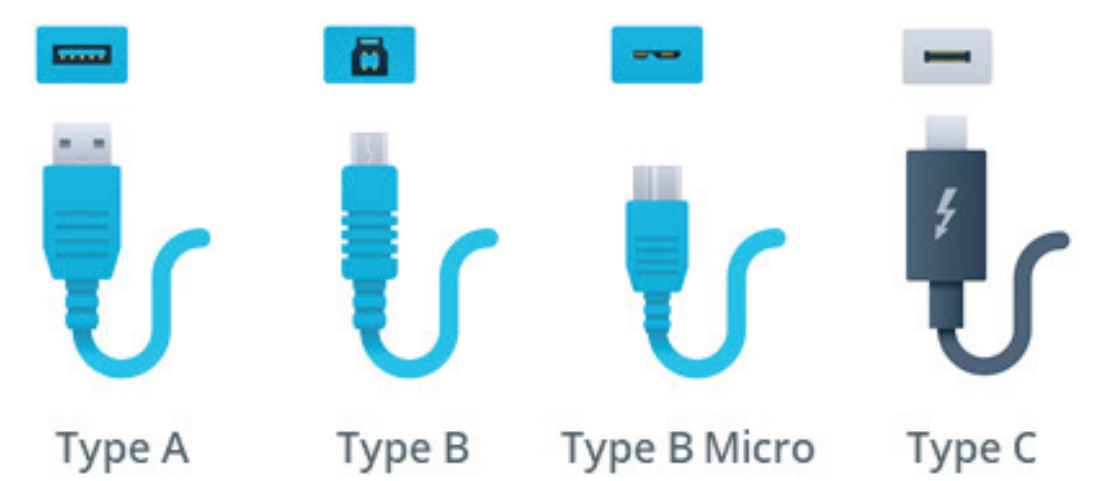
USB4 pushes speeds further to 40 Gbps (USB4 Version 2.0 can reach 80 Gbps), is built on the Thunderbolt 3 protocol, and requires a USB-C connector.
USB
2.0 devices can also provide a power output of up to 500 milliamps (mA) at 5
volts.
USB 2.0

Comments
Post a Comment